ADHD Time Blindness: What It Is and 7 Ways to See Time Again
Ten minutes feels like two, a quick task takes the whole afternoon, and suddenly you're late. What ADHD time blindness is, and 7 practical ways to make time visible again.
ADHD time blindness is trouble sensing how much time has passed and how long things will take. Ten minutes feels like two, a 15-minute task takes an hour, and suddenly you’re late. It isn’t a diagnosis but an everyday name for a real difficulty, and making time visible helps most.
You sit down to answer one email before you leave. When you look up, it’s twenty past and you should have left ten minutes ago. Or the opposite: the appointment is on Thursday, which feels far away, until it’s Thursday morning. If that sounds familiar, you’ve met time blindness.
What is ADHD time blindness?
Time blindness is a name for having a weak sense of time passing. It isn’t a medical term or a diagnosis. People with ADHD use it to describe a few things that tend to come together:
- Not noticing how much time has gone by while you’re busy with something.
- Guessing badly how long a task will take, usually too short.
- Things in the future feeling far away until they’re suddenly urgent.
- Waiting feeling much longer than it really is.
Is time blindness real?
Yes. Research finds that people with ADHD have more trouble judging time than people without it. A 2024 meta-analysis pooled 824 results from studies of children, teens and adults and found a clear difference at every age. An earlier meta-analysis of 55 studies found more trouble estimating and reproducing durations, from fractions of a second to several seconds.
Those lab tests use short stretches of time, not a whole afternoon, so they don’t measure everyday time blindness directly. But they fit what the National Institute of Mental Health lists for adults with ADHD: poor time management, planning or organization, and trouble remembering daily tasks.
What does time blindness look like day to day?
It usually shows up as a pattern, not a one-off:
- You leave “on time” and still arrive late, because getting out the door took longer than you counted on.
- Hours disappear when something holds your attention, and a quick task eats the evening.
- Your to-do list for the day would really take three days.
- A deadline two weeks away feels like no deadline at all.
- You don’t start something because “there isn’t enough time”, even when there is.
How do you manage time blindness?
You can’t feel time better by trying harder, so the trick is to stop relying on that feeling. Put time where you can see it, check your guesses, and leave room for things to run over. These 7 habits do that.
1. Put a clock where you can see it
Put a clock in the rooms where you lose time, like the kitchen, the bathroom and next to your desk. A phone clock doesn’t count, because you have to pick it up, and then you’re on your phone. An analog clock or a visual timer shows time as space that shrinks, which is easier to read at a glance than numbers.
2. Set a timer for the task, not just an alarm for the start
An alarm tells you when to begin, then leaves you alone. A timer for the task itself tells you when time is up. For anything you tend to get lost in, set a timer when you start and another one for when you need to stop and get ready.
3. Guess, then check how long things really take
Before a task, write down how long you think it’ll take. Afterwards, write down how long it took. Most people underestimate their own tasks. Psychologists call this the planning fallacy, and it happens even when people know their past tasks ran over. A few weeks of real numbers (“the weekly shop takes 70 minutes, not 30”) beats any feeling.
4. Work back from the time you need to be done
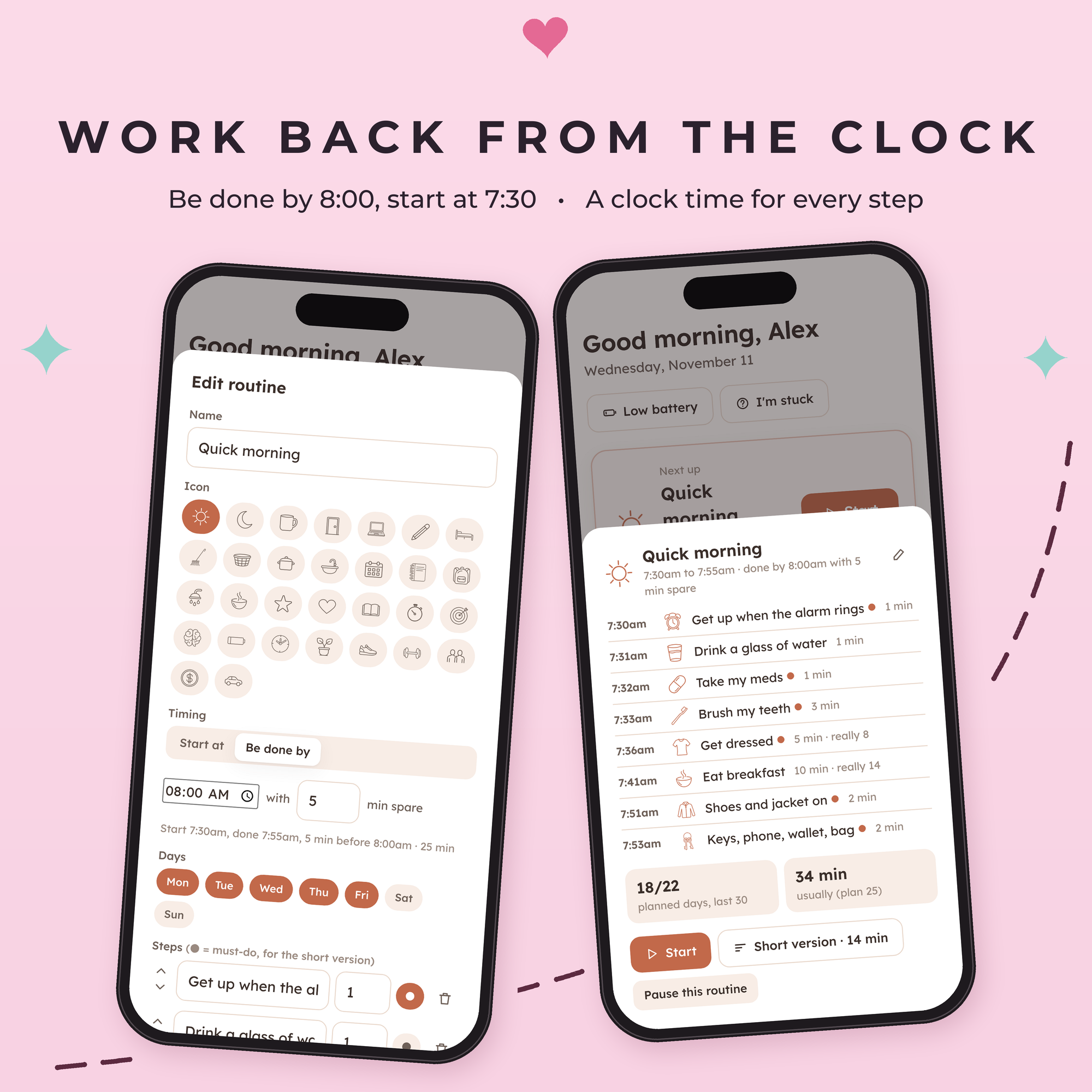
Instead of asking “when should I start?”, start from the end. If you need to leave at 8:00 and getting ready takes 30 minutes, you start at 7:30. Add a few spare minutes and it’s 7:25. Set the alarm for that start time, not for the time you need to leave.
5. Add buffers between things
Leave 10 to 15 minutes between appointments and tasks. Switching from one thing to the next takes time too: finding your keys, closing the laptop, the bathroom break. Without buffers, one late start pushes back the whole day.
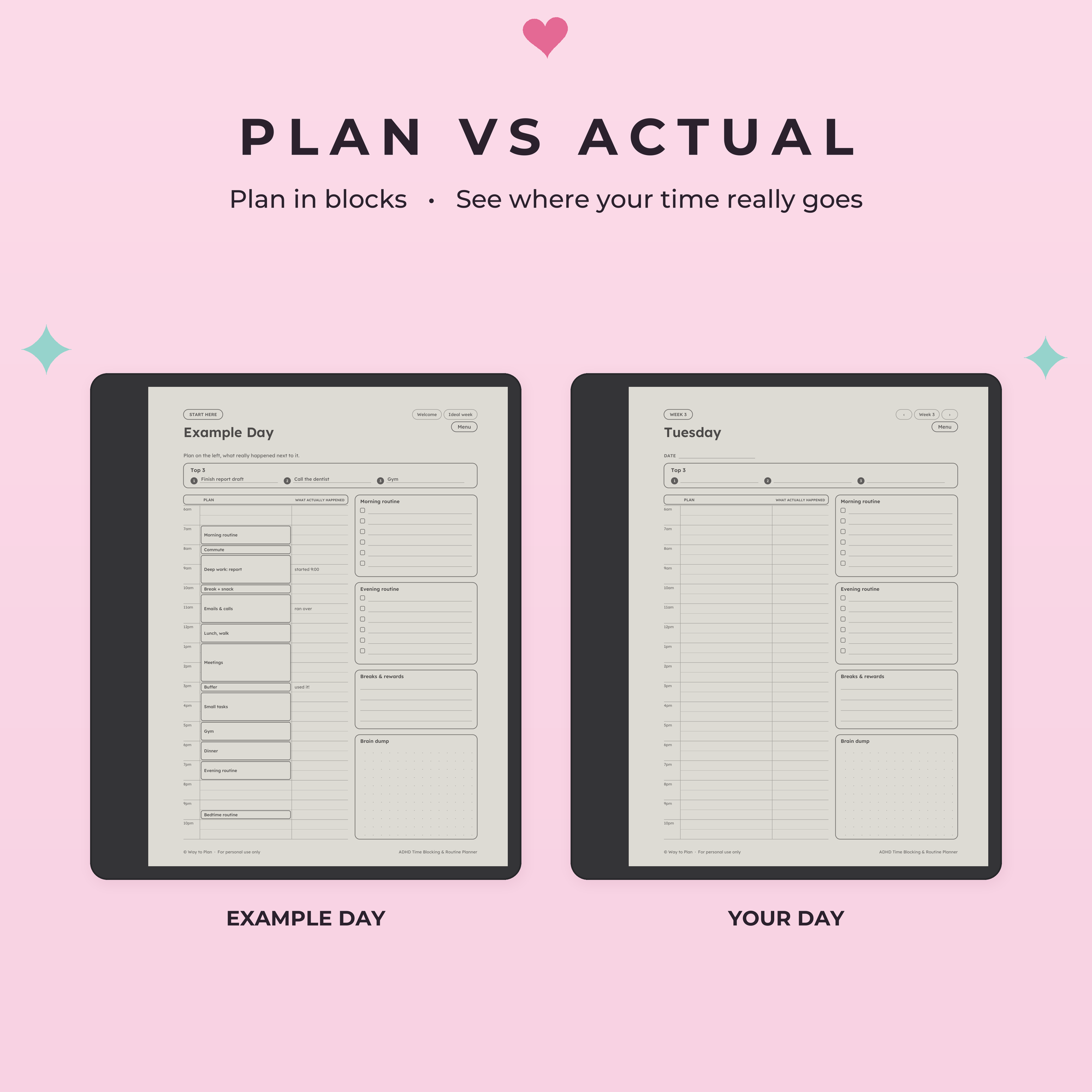
6. Plan your day in blocks, then write what happened
Time blocking means giving tasks a slot on the clock instead of a list with no times. It shows straight away when your day is too full. The second half is the one that teaches you the most: next to the plan, note what actually happened. After a week, you’ll see where your hours really go.
7. Keep a short version for late days
Some days you’ll still run late. Decide in advance which steps of your routine are must-dos, so on a late morning you skip the rest without having to think. A short version that you actually finish beats a full one you abandon halfway.
What should you do first?
Start with one clock and one timer. Put a clock where you lose the most time, and use a timer for the task that most often runs over. Then try a week of guessing and checking. I have ADHD and I design my planners around it, and what helps me is the same idea: keep it in sight and keep it to a few things a day.
If your head is too full to plan anything, start with a brain dump and pick three things for today. And if the hard part is starting at all, a dopamine menu can help.
Where can you get a planner for time blindness?
A notebook with a clock next to it is a fine start. If you’d like the pages done for you, the Way to Plan time blocking planners have a plan next to “what actually happened”, a time estimate log and space for buffers.

- E-ink tablets: the ADHD Time Blocking & Routine Planner, undated, with daily half-hour plans next to what actually happened, a time estimate log, a transitions and buffers page and 6 routines to time step by step. Made for the Kindle Scribe, Kindle Scribe Colorsoft, reMarkable Paper Pro Move, reMarkable Paper Pro, reMarkable Paper Pure and reMarkable 2, Supernote Nomad, Supernote Manta, Boox Go 10.3 and Boox Note Air C.
- iPad: the ADHD Time Blocking & Routine Planner for iPad, for GoodNotes and other PDF apps.
- Printable: the time block schedule, where you color in hourly blocks for a whole week.
- Phone and laptop: the ADHD Routine Planner App shows one step at a time with a countdown and a line like “Running 4 min late”, and works back from the time you need to be done.
Not sure which kind of planner suits you? This guide on how to choose the best ADHD planner goes through the layouts that help.
Frequently asked questions
Time blindness isn’t an official symptom name, but the difficulty is real. Studies find that people with ADHD have more trouble judging time than people without ADHD, at every age. Poor time management is listed among adult ADHD symptoms.
Yes, to a degree. Most people underestimate how long their own tasks will take, which psychologists call the planning fallacy. Research finds that misjudging time is more common and more marked in people with ADHD.
One you can see without picking it up. An analog clock or a visual timer shows time as space that gets smaller, which is easier to read at a glance than numbers. Put one in each room where you tend to lose track of time.
Work back from the time you need to leave, add a few spare minutes, and set your alarm for the start time. Time how long getting ready really takes, and keep a short version of your routine for days you’re running late.